


Do you need a certain way to make sure you’re creating content your audience really wants?
Knowing what type of content to create and when to post it is half the battle of becoming a social media influencer.
You may have lots of ideas to work with, but how can you be sure your audience will actually want them?
In this post, we share tips on how to crowdsource content ideas directly from your audience on social media.
1. Search Social Media
The easiest way to find content ideas is to search social media.
Search for topics related to your niche, and read the comment sections of your competitors.
You can also use social media listening tools. This type of tool compiles posts that mention a specific keyword from multiple platforms into one dashboard.
Vista Social, Agorapulse, and Iconosquare all have great social media listening features.
Whether you search social media yourself or use listening tools, what you’re looking for are the questions your audience asks or the problems they complain about.
There’s also a chance that your competitors aren’t answering all of their questions, which is what you’re looking for when you browse your competitors’ comment sections.
These are things you can provide solutions for in your content.
2. Read your DMs and comment sections
You should also be aware of the questions your audience asks you directly.
Keep an eye on your direct messages (DMs) as well as your comments section. Your listeners may ask follow-up questions or your advice about something.
They may also make requests or suggestions for additional content.
It is popular on TikTok because of a feature that allows creators to respond to comments with videos.
Here’s an example from @sunwelfashion_kate.
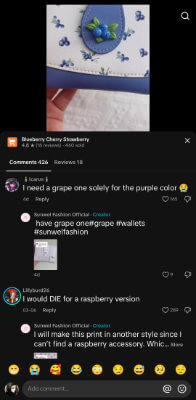
This manufacturer posted a video advertising a wallet with a blueberry print and a blueberry clasp style.
When a user said they wanted a grape so they could get the purple wallet, the creator immediately responded with a video showing off their grape wallet.
3. Ask your audience directly in the video
If you’re still not sure whether the ideas you’ve chosen are of interest to your audience, try asking them directly what they’d like to see.
Film a short-form video, and post it wherever you have a presence, including TikTok. instagram reelsYouTube Shorts and Facebook Reels.
Recap videos you’ve recently posted and share analysis about them with your audience.
Share any ideas you have and videos you’re already working on.
Then, end the video by asking your audience what they want to see from you and if they’re interested in any of your ideas.
4. Use Instagram Stories
Instagram Stories has lots of features you can use to ask simple questions of your audience.
With stickers, you can add an interactive poll or question-and-answer element to your Stories to gauge your audience’s opinion about something or ask them for their ideas.
With poll stickers, you can ask a question, then ask your audience to choose between two and four options.
With question stickers, you can ask your audience a question and ask them to use the sticker to provide your answer.
You can also create new stories with their answers so you can ask the rest of your audience what they think about the idea.
5. Use Twitter (X)
Twitter (X) has a poll feature that you can use to ask your audience a question and give them a few different options to choose from.
If you create a poll for Instagram Stories, you can also create it on Twitter if you have a presence on that platform.
You can also create polls on Twitter competitors BlueSky and Threads.
6. Publish a community post on YouTube
Community posts are a lesser-used feature on YouTube, but they appear in the Home feed within the app.
You can use community posts to create a simple survey to ask your audience about videos they want to see from you.
This is a particularly useful method to use if most of your short-form videos are short clips taken from YouTube videos you’ve published.
Plus, YouTube allows you to post image-based polls on the app, so you can show a preview of your video views to give your viewers a better example of what they’re actually voting for.
7. Use Facebook Polls
Facebook offers a few different ways for you to create polls within the app.
You can create polls in posts, stories, reels, groups, and even messenger chats.
If your audience is on Facebook, determine what types of posts get you the highest levels of engagement. These are the post types you should create polls for.
Even if you create a poll for a Reel or Story, you should still create a poll for your Facebook group because not everyone in your group will necessarily follow your Facebook Page.
8. Add a Poll or Survey to Your Website
Let’s say you primarily post content on TikTok, a platform that has fewer interactive features than Instagram, YouTube, and Facebook.
You can collect audience feedback in your comments section, but you can also collect more definitive data by asking them to fill out polls or surveys on your website.
Of course, you can always ask them to fill out the poll on another social media app, but that will require them to have accounts for those apps.
On your website, they can simply fill out your poll, and submit it.
Alternatively, you can ask them to enter their email address to submit their responses. This is a great way to build your email list.
Woorise is a great tool to use for adding polls and surveys to your website. It is used by Ikea, Airbnb, Ford, Asos and UNICEF.
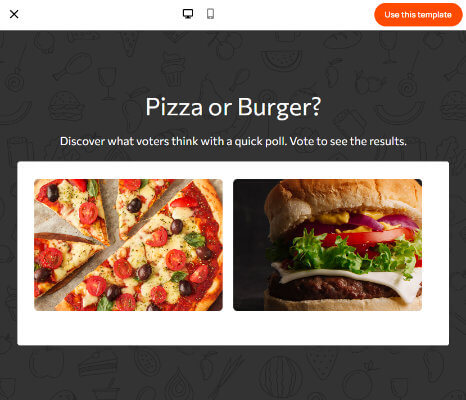
As well as a simple survey that asks your audience to choose one option from several options, you can create satisfaction surveys to assess your audience’s satisfaction with your content overall.
If you don’t have a full website to embed your survey, Voorhees will also host a landing page for you.
9. Host a contest
A contest is a great way to encourage your audience to respond. You can ask them to fill out a simple textbox to submit their entries.
Ask them to share their opinions about what type of content they’d like to receive from you, or ask them to share personal struggles they’ve had in their field.
In return they get a chance to win a free product from you.
SweepWidget is a great tool to use for this purpose.
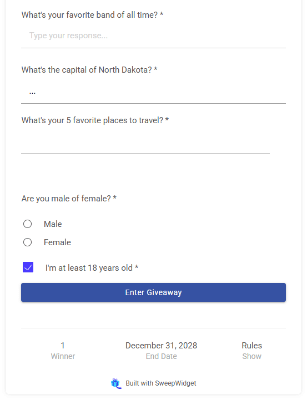
This allows you to Host Social Media Giveaways On your website, however, it also has options for hosting landing pages.
Along with entry methods that involve interacting with your social media content and profiles in various ways (such as liking a specific Instagram post), you can add a form to the giveaway element that includes questions that your followers are required to answer in order to submit their entry.
10. Create a private community
A private community is a membership you offer to your audience that they pay to access.
You can host it yourself, but most social media creators create private communities on platforms like Patreon, YouTube, Twitch, Discord, and similar platforms.
Patreon, in particular, allows you to create a variety of post types, including video, image, and text-based posts.
Members of your Patreon page can leave comments on posts. This little feature gives you a way to ask the most engaged members of your audience for content ideas.
You can do this directly or subtly. Subtly this would mean asking them about the problems they are facing in your area.
You can also add polls to Patreon posts if you want to ask Patreons’ opinion about some different ideas.
11. Visit Reddit or other forums
You may find it difficult to build a presence on Reddit and similar forums, but that doesn’t mean they aren’t social media platforms.
They are still a way for your target audience to come together and discuss topics related to your topic.
Regularly browse subreddits and forums related to your topic in search of content ideas.
Like the first tip we gave, pay attention to the questions your audience asks and the complaints they make.
You can also post your own questions to gather feedback about ideas, such as asking a subreddit for your topic what their biggest challenge has been.
how to organize your thoughts
Write down every thought you see. You can use plain old pen and paper, a document in Google Docs or Microsoft Word, a note-taking app like Notion, a project management app like Trello, or even a mindmap app like Xmind, Milonote or Coggle.
Also pay attention to how often you see your audience talking about a specific idea. To make things easier you can give each idea an interest grade (high, medium or low).
When your research is complete, organize your ideas according to level of interest.
Then, pick a few, and come up with unique social media content ideas for them.
How you deal with them from here is up to you. You can start with your audience’s favorite ideas, your personal favorite ideas, or even ideas that you feel you can tackle appropriately without going over the budget.
Disclosure: Our content is reader-supported. If you click on certain links we may make a commission.